数据类型#
from helper.python import print_subclasses
from helper.jupyter import row
import numpy as np
import polars as pl
Polars 提供了多种数据类型,用来高效地保存和计算不同的数据。本章依次介绍这些类型,说明各自的特性与用途。
选择哪种类型,会同时影响内存占用和可用的运算。例如把日期存成字符串,排序就会按字典序进行,减法也会直接报错;把金额存成 Float64,累加次数一多就会出现小数误差。因此,先理清有哪些类型、各自适合什么场景,再编写转换。
数据类型的继承树#
Polars 的数据类型较多,彼此之间有明确的继承关系。下面先看继承树的结构,再逐个说明各类型。这棵树既展示类型如何组织,也说明哪些类型之间可以互相转换。NumericType、TemporalType 这些主要类型还分成更具体的子类,各自针对一类数据处理做了优化,NestedType 则负责列表、结构体这类嵌套结构。
print_subclasses(pl.DataType)
└──DataType
   ├──NumericType
   │  ├──IntegerType
   │  │  ├──SignedIntegerType
   │  │  │  ├──Int8
   │  │  │  ├──Int16
   │  │  │  ├──Int32
   │  │  │  ├──Int64
   │  │  │  └──Int128
   │  │  └──UnsignedIntegerType
   │  │     ├──UInt8
   │  │     ├──UInt16
   │  │     ├──UInt32
   │  │     ├──UInt64
   │  │     └──UInt128
   │  ├──FloatType
   │  │  ├──Float16
   │  │  ├──Float32
   │  │  └──Float64
   │  └──Decimal
   ├──TemporalType
   │  ├──Date
   │  ├──Time
   │  ├──Datetime
   │  └──Duration
   ├──NestedType
   │  ├──List
   │  ├──Map
   │  ├──Array
   │  └──Struct
   ├──ObjectType
   │  └──Object
   ├──Boolean
   ├──String
   ├──Binary
   ├──Categorical
   ├──Enum
   ├──Null
   ├──Unknown
   └──BaseExtension
      └──Extension
数值型
NumericType:数值型的基类,处理整数型、浮点型等数值数据。
IntegerType:整数数据的基类。
SignedIntegerType:有符号整数,如
Int8、Int16、Int32、Int64。UnsignedIntegerType:无符号整数,如
UInt8、UInt16、UInt32、UInt64。
FloatType:浮点数据的基类,如
Float32、Float64。Decimal:定点小数,用于高精度数值计算。
时序型
TemporalType:与时间相关的数据类型的基类。
Date:日期,例如
2024-07-18。Time:时刻,例如
12:34:56。Datetime:日期时间,例如
2024-07-18 12:34:56。Duration:时间长度,例如 5 分钟、2 小时。
嵌套型
NestedType:带嵌套结构的数据类型的基类。
List:元素列表,列表内的元素必须是同一数据类型。
Array:定长数组。
Struct:结构体,可以带多个数据类型不同的字段。
其他类型
Boolean:真值,取
True或False。String:字符串数据。
Binary:二进制数据。
Categorical:分类数据,按类别值高效管理。
Enum:枚举型数据。
Object:任意 Python 对象,用于存放不匹配特定类型的数据。
Null:NULL 值,用于表示缺失值。
Unknown:未知的数据类型。
数据类型转换#
Cast#
Polars 提供了多种类型转换函数,最常用的两个是 cast() 和 shrink_dtype():前者改变类型,后者在保持值不变的前提下把类型收缩到满足需要的最小尺寸。下面分别说明。
df = pl.DataFrame(
    {
        "a": [3, 3, 3, 4],
        "b": [4, 12, 6, 7],
        "g": ['B', 'A', 'A', 'C']
    }
)
df
| a | b | g |
|---|---|---|
| i64 | i64 | str |
| 3 | 4 | "B" |
| 3 | 12 | "A" |
| 3 | 6 | "A" |
| 4 | 7 | "C" |
cast() 把列转换为指定的数据类型,用于改变数据的表示形式,例如把整数列转成浮点列,或把字符串列转成日期型。
转换失败时默认直接报错,这比悄无声息地变成 NULL 更安全。数据里确实有异常值时,可以改用 strict=False,让这些值变成 NULL,后续如何处理由调用方决定。
df.with_columns(
    pl.col.a.cast(pl.UInt8),
    pl.col.b.cast(pl.String)
)
| a | b | g |
|---|---|---|
| u8 | str | str |
| 3 | "4" | "B" |
| 3 | "12" | "A" |
| 3 | "6" | "A" |
| 4 | "7" | "C" |
shrink_dtype() 按值的范围把数据类型收缩到所需的最小尺寸。例如 Int64 的列实际只需要 Int8 时,内存占用可以降到八分之一。
这对内存和缓存都很友好,代价是多一次全列扫描。Polars 2.0 中它不能再从表达式(Expr)上调用,而改成了 Series 的方法,所以要先在列上取出 Series,再收缩类型。
df2 = pl.DataFrame({name: df[name].shrink_dtype() for name in df.columns})

print(df.dtypes)
print(df2.dtypes)
[Int64, Int64, String]
[Int8, Int8, String]
在 8 位和 16 位整数上,有符号型与无符号型之间的转换需要把 cast() 的 wrap_numerical 参数设为 True。默认情况下,Polars 会检查值是否落在目标类型的范围内;设为 True 后,超出范围的值按补码回绕,而不是报错。
这个参数目前只支持 8 位和 16 位整数:Int8 与 UInt8、Int16 与 UInt16 之间位宽相同,回绕后的结果就是按另一种符号解释同一串位。下面的代码先把 Int16 负值转成 UInt16,再把 UInt16 大值转回 Int16,以观察回绕效果。
df = pl.DataFrame(
    [
        pl.Series("A", [1, 2, -1, -2], dtype=pl.Int16),
        pl.Series("B", [1, 2, 0xffff, 0xfffe], dtype=pl.UInt16)
    ]
)

df.select(
    pl.col('A').cast(pl.UInt16, wrap_numerical=True),
    pl.col('B').cast(pl.Int16, wrap_numerical=True),
)
| A | B |
|---|---|
| u16 | i16 |
| 1 | 1 |
| 2 | 2 |
| 65535 | -1 |
| 65534 | -2 |
重新解释数据类型#
cast() 会改变数据的数值,而有时候要保留原来的字节表示、只按另一种类型去读,类似 NumPy 的 .view(),这时用 reinterpret()。
两者的区别在于是否改变数值:cast(pl.Int64) 从 3.0 得到 3,reinterpret 则按位重新解释,结果可能完全不同。它的用途就是“同一串字节,换一种读法”。
df_wrong = pl.DataFrame({"nums": [4837362400224322580, None, 4837362400224322584]}, schema={"nums": pl.UInt64})
df_fixed = df_wrong.select(pl.col("nums").reinterpret(dtype=pl.Float64))
row(df_wrong, df_fixed)
shape: (3, 1)
|
shape: (3, 1)
|
reinterpret() 的 signed 参数用于在有符号整数与无符号整数之间重新解释:signed=False 按无符号整数读,signed=True 按有符号整数读。
另外,reinterpret(dtype=...) 也能在整数与浮点数之间转换,但源类型与目标类型的字节大小必须相同,例如把 Int32 重新解释成 Int64 就会因为大小不同而报错。下面的代码演示如何使用 signed 参数在有符号整数与无符号整数之间转换。
df = pl.DataFrame(
    [
        pl.Series("A", [1, 2, -1, -2], dtype=pl.Int32),
        pl.Series("B", [1, 2, 0xffffffff, 0xfffffffe], dtype=pl.UInt32)
    ]
)

df.with_columns(
    pl.col('A').reinterpret(signed=False),
    pl.col('B').reinterpret(signed=True)
)
| A | B |
|---|---|
| u32 | i32 |
| 1 | 1 |
| 2 | 2 |
| 4294967295 | -1 |
| 4294967294 | -2 |
要把二进制数据转换为字节数相同的数据类型,可以用 bin.reinterpret()。dtype 参数指定转换后的类型,endianness 参数指定字节序,取 "big" 或 "little"。下面的例子把二进制数据转换为 4 字节无符号整数 UInt32,并按大端(big-endian)解释。
df = pl.DataFrame({
    'binary_column': [b'\x00\x00\x00\x01', b'\x00\x00\x00\x02', b'\x00\x00\x00\x03', b'\x00\x00@A']
})

df.select(pl.col('binary_column').bin.reinterpret(dtype=pl.UInt32, endianness="big"))
| binary_column |
|---|
| u32 |
| 1 |
| 2 |
| 3 |
| 16449 |
下面看一个具体例子:《Quake III Arena》C 源代码中的快速平方根倒数(Fast inverse square root)。
这段代码用一个魔数 0x5f3759df,把浮点数按整数重新解释,再通过一次整数运算和一次牛顿迭代快速算出平方根的倒数。它当年是为了在没有浮点除法的硬件上计算光照,如今成了“类型重解释”最著名的例子。
import numpy as np
number = np.linspace(0.1, 10, 100)
y = number.astype(np.float32)  #❶
x2 = y * 0.5
i = y.view(np.int32)  #❷
i[:] = 0x5F3759DF - (i >> 1)  #❸
y = y * (1.5 - x2 * y * y)  #❹
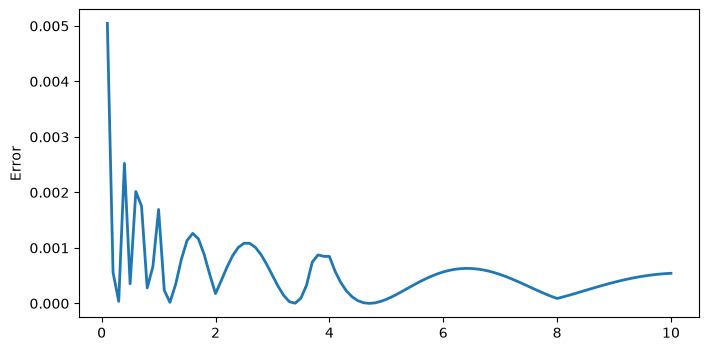
np.max(np.abs(1 / np.sqrt(number) - y))  #❺
np.float64(0.005045614041059743)
用 Polars 的 reinterpret() 可以实现同样的计算。关键在于分清两个动作:cast() 转换数值,reinterpret() 保留字节表示、只改变类型。下面的实现先把整数位移,再用 reinterpret() 读回浮点,最后用一次牛顿迭代提高精度。
import polars as pl
import numpy as np

# 用 Polars 的 reinterpret 实现 Q_rsqrt
number = np.linspace(0.1, 10, 100)
df = pl.DataFrame({"number": number})

result = (
    df.with_columns(pl.col("number").cast(pl.Float32).alias("y"))  #❶
    .with_columns((pl.col("y") * 0.5).alias("x2"))
    .with_columns(pl.col("y").reinterpret(dtype=pl.Int32).alias("i"))  #❷
    .with_columns(
        (0x5F3759DF - pl.col("i") // 2)  #❸
        .reinterpret(dtype=pl.Float32)
        .alias("y_approx")
    )
    .with_columns(
        (pl.col("y_approx") * (1.5 - pl.col("x2") * pl.col("y_approx") * pl.col("y_approx")))
        .alias("y_result")  #❹
    )
)

y_result = result["y_result"].to_numpy()
max_err = np.max(np.abs(1.0 / np.sqrt(number) - y_result))
print(f"最大误差: {max_err}")  #❺
result.head(5)  # 显示部分结果
最大误差: 0.005045614041059743
| number | y | x2 | i | y_approx | y_result |
|---|---|---|---|---|---|
| f64 | f32 | f32 | i32 | f32 | f32 |
| 0.1 | 0.1 | 0.05 | 1036831949 | 3.26486 | 3.157232 |
| 0.2 | 0.2 | 0.1 | 1045220557 | 2.26486 | 2.23551 |
| 0.3 | 0.3 | 0.15 | 1050253722 | 1.83243 | 1.825705 |
| 0.4 | 0.4 | 0.2 | 1053609165 | 1.63243 | 1.578616 |
| 0.5 | 0.5 | 0.25 | 1056964608 | 1.43243 | 1.41386 |
把误差的分布画出来。number 较小时绝对误差较大,但此时函数值本身也大,所以相对误差的变化并不明显。
import matplotlib.pyplot as plt
y_result = result["y_result"].to_numpy()

plt.figure(figsize=(8, 4))
plt.plot(number, 1 / np.sqrt(number) - y_result, lw=2)
plt.ylabel("Error");
字符串#
Polars 处理字符串的能力同样很强,相关的表达式函数都在 .str 命名空间下。
和 Python 的字符串方法相比,这些函数是向量化的:一次作用于整列,不必写循环,也不会为每个值新建对象。
字符串长度#
str.len_chars():统计字符串的字符数,也就是字符串中实际有几个字符。多字节字符(像日语里的假名)同样按 1 个字符计。str.len_bytes():统计字符串的字节数,也就是各字符编码后占用字节数的总和。多字节字符按多个字节计。
df = pl.DataFrame({
    "lib": ["pandas", "numpy", "polars", "図形"],
    "ver": ["2.0", "1.1.4", "1.2.1", "4.0"]
})

df.select(
    "lib",
    len_char=pl.col("lib").str.len_chars(),
    len_byte=pl.col("lib").str.len_bytes()
)
| lib | len_char | len_byte |
|---|---|---|
| str | u32 | u32 |
| "pandas" | 6 | 6 |
| "numpy" | 5 | 5 |
| "polars" | 6 | 6 |
| "図形" | 2 | 6 |
字符串的部分匹配检索#
用 str.contains()、str.starts_with()、str.ends_with() 等函数,可以检查是否包含特定子串、是否以指定字符串开头或结尾。
这些检查默认按字面量匹配,只有传入 literal=False 才按正则解释。如果把 literal 设错,就会得到意料之外的匹配结果。
df.filter(pl.col.lib.str.starts_with("p"))
| lib | ver |
|---|---|
| str | str |
| "pandas" | "2.0" |
| "polars" | "1.2.1" |
df.filter(pl.col.ver.str.ends_with("0"))
| lib | ver |
|---|---|
| str | str |
| "pandas" | "2.0" |
| "図形" | "4.0" |
df.filter(pl.col.lib.str.contains('p'))
| lib | ver |
|---|---|
| str | str |
| "pandas" | "2.0" |
| "numpy" | "1.1.4" |
| "polars" | "1.2.1" |
.str.contains() 也支持正则表达式。下面的代码取出形如“三个数字、两个点”的版本号所在的行。
df.filter(pl.col.ver.str.contains("^\d+\.\d+\.\d+$"))
<>:1: SyntaxWarning: "\d" is an invalid escape sequence. Such sequences will not work in the future. Did you mean "\\d"? A raw string is also an option.
<>:1: SyntaxWarning: "\d" is an invalid escape sequence. Such sequences will not work in the future. Did you mean "\\d"? A raw string is also an option.
C:\Users\ruoyu\AppData\Local\Temp\ipykernel_2356\1031424121.py:1: SyntaxWarning: "\d" is an invalid escape sequence. Such sequences will not work in the future. Did you mean "\\d"? A raw string is also an option.
  df.filter(pl.col.ver.str.contains("^\d+\.\d+\.\d+$"))
| lib | ver |
|---|---|
| str | str |
| "numpy" | "1.1.4" |
| "polars" | "1.2.1" |
.str.contains_any() 判断是否包含给定字符串或模式列表中的任意一个,用于一次检查多个关键词,比如从文本里筛出提到若干地名的行。
df2 = pl.DataFrame({
    "text": ["hello world", "data process library", "data science", "machine learning", "plot library"]
})

df2.filter(
    pl.col("text").str.contains_any(["science", "machine"])
)
| text |
|---|
| str |
| "data science" |
| "machine learning" |
.str.contains_any() 的参数也可以传表达式。直接传一列时,Polars 会把整列当成一个值,而不是逐行使用;因此要先 implode() 把整列压成一个列表,再传给模式列表参数。
这里容易出错:implode() 的作用正是把整列压成一个列表值,恰好对上“模式列表”这个参数。下面的代码先统计 text 列中出现频率最高的两个词,再用它们筛选包含这两个词的行。
expr = (
    pl.col.text.str.split(" ").explode().value_counts(sort=True).head(2).struct.field("text")
)
# 用 implode() 变成“值的列表”后再传给 contains_any
row(df2.select(expr), df2.filter(pl.col("text").str.contains_any(expr.implode())))
shape: (2, 1)
|
shape: (3, 1)
|
字符串替换#
.str.replace()、.str.replace_all() 用于替换特定的子串。
str.replace():只替换最先找到的前n个匹配,默认替换 1 个。str.replace_all():替换所有匹配。
df2.select(pl.col.text.str.replace_all('data', 'DATA'))
| text |
|---|
| str |
| "hello world" |
| "DATA process library" |
| "DATA science" |
| "machine learning" |
| "plot library" |
字符串分割#
str.split() 按指定的分隔符把字符串拆成列表。分隔符可以是单个字符,也可以是多字符的字符串;结果列是 List 型,列表长度由每行实际出现的分隔符数量决定。
str.split_exact() 则把字符串拆成固定数量的部分:第二个参数给出拆分次数,结果是一个结构体列,字段名为 field_0、field_1……,最后一段保留剩余内容。需要固定列数时用它,比先拆分再截断更直接。下面的例子分别演示两种拆分。
df2.with_columns([
    pl.col("text").str.split(" ").alias("split")
])
| text | split |
|---|---|
| str | list[str] |
| "hello world" | ["hello", "world"] |
| "data process library" | ["data", "process", "library"] |
| "data science" | ["data", "science"] |
| "machine learning" | ["machine", "learning"] |
| "plot library" | ["plot", "library"] |
df2.with_columns([
    pl.col("text").str.split_exact(" ", 1).alias("split_exact")
])
| text | split_exact |
|---|---|
| str | struct[2] |
| "hello world" | {"hello","world"} |
| "data process library" | {"data","process"} |
| "data science" | {"data","science"} |
| "machine learning" | {"machine","learning"} |
| "plot library" | {"plot","library"} |
字符串裁剪#
str.strip_chars() 去掉字符串两端出现在指定字符集合中的字符;不传参数时默认去掉空白。str.strip_prefix() 和 str.strip_suffix() 则只处理开头或结尾的固定前缀、后缀,匹配不上时原样返回。
裁剪不会改动中间的字符。下面的例子对同一列分别做三种裁剪,便于对照结果。
df3 = pl.DataFrame({
    "text": [" hello ", " world", "polars ", "is ", " awesome"]
})

df3.with_columns([
    pl.col("text").str.strip_chars(" ").alias("stripped"),
    pl.col("text").str.strip_prefix(" ").alias("no_prefix"),
    pl.col("text").str.strip_suffix(" ").alias("no_suffix")

])
| text | stripped | no_prefix | no_suffix |
|---|---|---|---|
| str | str | str | str |
| " hello " | "hello" | "hello " | " hello" |
| " world" | "world" | "world" | " world" |
| "polars " | "polars" | "polars " | "polars" |
| "is " | "is" | "is " | "is" |
| " awesome" | "awesome" | "awesome" | " awesome" |
str.strip_chars():去掉两端指定的字符,例子中传入的是空格。str.strip_prefix():去掉开头处指定的前缀,例子中是空格。str.strip_suffix():去掉结尾处指定的后缀,例子中是空格。
字符串填充#
str.pad_start() 在字符串左侧填充到指定长度,str.pad_end() 在右侧填充。第一个参数是目标长度,第二个参数是填充字符;原字符串已经达到或超过目标长度时,不会被截断,而是原样返回。
填充常用于对齐文本或补足编号的前导零。下面的例子把每个字符串补到 20 个字符,左侧用 - 填满。
df2.with_columns([
    pl.col("text").str.pad_start(20, "-").alias("padded")
])
| text | padded |
|---|---|
| str | str |
| "hello world" | "---------hello world" |
| "data process library" | "data process library" |
| "data science" | "--------data science" |
| "machine learning" | "----machine learning" |
| "plot library" | "--------plot library" |
字符串抽取#
要从字符串中抽出与模式匹配的部分,用 str.extract()、str.extract_all()、str.extract_groups()、str.extract_many() 等函数。
str.extract(pattern, group_index) 按正则表达式返回匹配到的指定捕获组,两个参数的含义是:
pattern:正则表达式模式。用()括起的捕获组从字符串中抽出特定的部分,捕获组可以定义多个,此时各组按 1、2、3… 编号。group_index:捕获组的编号,决定取正则中的哪一个组。
下面的代码在 pattern 中定义两个捕获组,通过 group_index 分别取出项目 A 与项目 B 的数值。
df = pl.DataFrame({
    "text": ["Item A: 50, Item B: 30", "Item A: 70, Item B: 45"]
})

pattern = r'Item A: (\d+), Item B: (\d+)'

df.select(
    pl.col("text").str.extract(pattern, 1).alias("A_value"),
    pl.col("text").str.extract(pattern, 2).alias("B_value"),
)
| A_value | B_value |
|---|---|
| str | str |
| "50" | "30" |
| "70" | "45" |
str.extract_groups() 抽出正则的所有捕获组,并作为结构体(Struct)列返回。
未指定组名时,组编号(1、2、3…)成为字段名。
(
df.select(
    pl.col('text').str.extract_groups(pattern).alias('values')
)
.unnest('values')
)
| 1 | 2 |
|---|---|
| str | str |
| "50" | "30" |
| "70" | "45" |
正则中使用具名捕获组(
?P<name>...)时,该名字成为字段名。
pattern_named = r'Item A: (?P<A_value>\d+), Item B: (?P<B_value>\d+)'

(
df.select(
    pl.col("text").str.extract_groups(pattern_named).alias('values')
)
.unnest('values')
)
| A_value | B_value |
|---|---|
| str | str |
| "50" | "30" |
| "70" | "45" |
str.extract_all() 把正则匹配到的所有部分按列表返回。
df.select(
    pl.col("text").str.extract_all(r'\d+').alias('values')
)
| values |
|---|
| list[str] |
| ["50", "30"] |
| ["70", "45"] |
Polars 没有像 re.split() 那样按正则分割字符串的函数。下面改用 extract_all() 抽出包含分割模式的所有部分,再用 list.eval() 从每个字符串里删除分割模式,实现同样的功能。
用
extract_all()抽出包含分割模式(and|after|or|then)的所有部分。用
list.eval()和str.replace()把分割模式替换成空字符串""。
这样就得到了与 re.split() 相当的结果。
df = pl.DataFrame(
    {"text": [
        "DOGandCATafterFISHorBIRDthenMOUSE",
        "a or b or c"
    ]})

pattern = "and|after|or|then"

def split(expr, pattern):
    return expr.str.extract_all(rf".*?({pattern}|$)").list.eval(pl.element().str.replace(pattern, ''))

df.select(pl.col('text').pipe(split, pattern)).get_column('text').to_list()
[['DOG', 'CAT', 'FISH', 'BIRD', 'MOUSE'], ['a ', ' b ', ' c']]
str.extract_many() 使用 Aho-Corasick 算法,从字符串中抽出与指定模式匹配的所有部分。它不用正则,只做字面量匹配,检索效率很高,在超大数据集上也有不错的表现。参数如下。
patterns:要检索的模式列表,像["apple", "banana", "orange"]这样把想找的词或字符串以列表给出。ascii_case_insensitive:是否启用不区分大小写的匹配。overlapping:是否允许重叠匹配。设为True时,同一字符串内多个模式重叠出现,各自作为一次独立匹配。
df = pl.DataFrame({
    "text": ["I like apples and bananas", "I prefer oranges and pineapples"]
})

# 检索 "apple" 和 "banana"
df.select(
    pl.col("text").str.extract_many(["apple", "banana"]).alias("matches")
)
| matches |
|---|
| list[str] |
| ["apple", "banana"] |
| ["apple"] |
Enum 与 Categorical#
Enum 型(枚举型)只能从固定的值集合中取值,因此能保证数据一致、防止写错值,定义之外的值无法写入。
Categorical 型(分类型)同样只有有限个类别,但侧重避免重复存储、压缩内存。两者看起来相似,区别在于“值的集合是否事先固定”:Enum 适合星期、等级这类取值固定的字段,Categorical 适合类别较多、无法事先列全的字段,比如商品名。
score = pl.Enum(['A', 'B', 'C', 'D'])
df = pl.DataFrame(
    {
        "a": [3, 3, 3, 4],
        "b": [4, 12, 6, 7],
        "g": ['B', 'A', 'A', 'C']
    }
)
df2 = df.select(
    pl.col.g.cast(score).alias('g_enum'),
    pl.col.g.cast(pl.Categorical).alias('g_cat')
)
df2
| g_enum | g_cat |
|---|---|
| enum | cat |
| "B" | "B" |
| "A" | "A" |
| "A" | "A" |
| "C" | "C" |
to_physical() 返回内部保存的编号。g_enum 使用 score 中定义的编号;g_cat 则按原列值出现的先后顺序编号。
df2.select(pl.all().to_physical())
| g_enum | g_cat |
|---|---|
| u8 | u32 |
| 1 | 0 |
| 0 | 1 |
| 0 | 1 |
| 2 | 2 |
下面的代码展示 Categorical 列使用不同编码时的差异。两个 Categorical 列如果来自不同的类别表,内部编号的含义就不一致;直接比较或运算时,Polars 需要先对齐两套编号,速度会明显变慢。
df3 = pl.DataFrame(dict(
    c1 = pl.Series(["Polar", "Panda", "Brown", "Brown", "Polar"], dtype=pl.Categorical),
    c2 = pl.Series(["Panda", "Brown", "Brown", "Polar", "Polar"], dtype=pl.Categorical),
))

df3.with_columns(pl.all().to_physical().name.suffix('_code'))
| c1 | c2 | c1_code | c2_code |
|---|---|---|---|
| cat | cat | u32 | u32 |
| "Polar" | "Panda" | 3 | 4 |
| "Panda" | "Brown" | 4 | 5 |
| "Brown" | "Brown" | 5 | 5 |
| "Brown" | "Polar" | 5 | 3 |
| "Polar" | "Polar" | 3 | 3 |
下面用 pl.StringCache() 创建共享同一类别表的 Categorical 列。
备注
Polars 2.0 中 StringCache 已弃用,将由 pl.Categories 取代。行为不变,但执行时会给出弃用警告。
with pl.StringCache() as s:
    df4 = pl.DataFrame(dict(
        c1 = pl.Series(["Polar", "Panda", "Brown", "Brown", "Polar"], dtype=pl.Categorical),
        c2 = pl.Series(["Panda", "Brown", "Brown", "Polar", "Polar"], dtype=pl.Categorical),
    ))

df4.with_columns(pl.all().to_physical().name.suffix('_code'))
C:\Users\ruoyu\AppData\Local\Temp\ipykernel_2356\2951187117.py:1: DeprecationWarning: the string cache has been replaced by pl.Categories
  with pl.StringCache() as s:
| c1 | c2 | c1_code | c2_code |
|---|---|---|---|
| cat | cat | u32 | u32 |
| "Polar" | "Panda" | 3 | 4 |
| "Panda" | "Brown" | 4 | 5 |
| "Brown" | "Brown" | 5 | 5 |
| "Brown" | "Polar" | 5 | 3 |
| "Polar" | "Polar" | 3 | 3 |
List 与 Array#
要在单个元素里存多个值,就用 List 列或 Array 列。Array 列要求每个元素长度固定,List 列则允许长度不同。
这个区别同时影响性能和可用的操作:Array 长度固定,可以按矩阵方式存放,取值和运算更快。List 更灵活,但要做数值计算时往往需要先 explode()。处理这两类元素的表达式函数分别在 array 和 list 命名空间下。
df = pl.DataFrame(
    dict(
        a_list=[[1, 2], [3, 4], [5, 6, 7]],
        b_arr=[[1, 2, 3], [3, 4, 5], [5, 6, 7]]
    ),
    schema=dict(a_list=pl.List(pl.Int8), b_arr=pl.Array(pl.Int8, 3))
)
df
| a_list | b_arr |
|---|---|
| list[i8] | array[i8, 3] |
| [1, 2] | [1, 2, 3] |
| [3, 4] | [3, 4, 5] |
| [5, 6, 7] | [5, 6, 7] |
下面的代码用 list 命名空间中的 max()、mean()、len() 计算 a_list 列各列表的最大值、平均值和元素个数,并把结果添加为新列,同时用 arr.max() 计算 b_arr 列各数组的最大值。arr 命名空间相对较新,1.24.0 版本中还不支持 arr.len() 和 arr.mean()。
df.with_columns(
    a_max=pl.col("a_list").list.max(),
    a_mean=pl.col("a_list").list.mean(),
    a_len=pl.col("a_list").list.len(),
    b_max=pl.col("b_arr").arr.max(),
)
| a_list | b_arr | a_max | a_mean | a_len | b_max |
|---|---|---|---|---|---|
| list[i8] | array[i8, 3] | i8 | f64 | u32 | i8 |
| [1, 2] | [1, 2, 3] | 2 | 1.5 | 2 | 3 |
| [3, 4] | [3, 4, 5] | 4 | 3.5 | 2 | 5 |
| [5, 6, 7] | [5, 6, 7] | 7 | 6.0 | 3 | 7 |
get 与 gather#
用 list.get(index) 或 arr.get(index) 取出指定索引处的元素。下面的代码计算 a_list 列各列表首元素与末元素之和,对 b_arr 列做同样的处理。
df.with_columns(
    a_first_plus_last = pl.col('a_list').list.get(0) + pl.col('a_list').list.get(-1),
    b_first_plus_last =pl.col('b_arr').arr.get(0) + pl.col('b_arr').arr.get(-1),
)
| a_list | b_arr | a_first_plus_last | b_first_plus_last |
|---|---|---|---|
| list[i8] | array[i8, 3] | i8 | i8 |
| [1, 2] | [1, 2, 3] | 3 | 4 |
| [3, 4] | [3, 4, 5] | 7 | 8 |
| [5, 6, 7] | [5, 6, 7] | 12 | 12 |
list.gather(indices) 按一组索引取出元素,结果存成新的列表列。null_on_oob 默认是 False,此时越界的索引会直接报错;设为 True,越界位置就填入 Null。下面的代码按 [2, 1, 0] 的顺序重排每个列表,越界处填 Null。
df.select(
    'a_list',
    gather=pl.col('a_list').list.gather([2, 1, 0], null_on_oob=True)
)
| a_list | gather |
|---|---|
| list[i8] | list[i8] |
| [1, 2] | [null, 2, 1] |
| [3, 4] | [null, 4, 3] |
| [5, 6, 7] | [7, 6, 5] |
concat_list 与 concat_arr#
pl.concat_list() 把指定的列或表达式结果按列表合并,可以把多个列的值汇总到一个列表列。pl.concat_arr() 则把多个表达式的结果合并成数组。
df = pl.DataFrame(
    {
        "a": [3, 3, 3, 4],
        "b": [4, 12, 6, 7],
        "g": ['B', 'A', 'A', 'C']
    }
)

df.with_columns(
    pl.concat_list(['a', 'b', pl.col('a') + pl.col('b')]).alias('ab_list'),
    pl.concat_arr(['a', 'b', pl.col('a') + pl.col('b')]).alias('ab_arr'),
)
| a | b | g | ab_list | ab_arr |
|---|---|---|---|---|
| i64 | i64 | str | list[i64] | array[i64, 3] |
| 3 | 4 | "B" | [3, 4, 7] | [3, 4, 7] |
| 3 | 12 | "A" | [3, 12, 15] | [3, 12, 15] |
| 3 | 6 | "A" | [3, 6, 9] | [3, 6, 9] |
| 4 | 7 | "C" | [4, 7, 11] | [4, 7, 11] |
用 pl.concat_list() 把多个列转成一个列表列之后,就可以用 .list 下的方法做各种计算。下面的程序用这种办法做了两项计算。
A、C、E三列按行求和,同样的结果也可以用pl.sum_horizontal()得到。按行求中位数。
df_numbers = pl.DataFrame(
    np.random.randint(0, 10, size=(6, 5)), schema=list("ABCDE")
)
df_numbers.with_columns(
    pl.concat_list('A', 'C', 'E').list.sum().alias('sum_ACE'),
    pl.sum_horizontal(pl.col('A', 'C', 'E')).alias('sum_ACE2'),
    pl.concat_list('*').list.median().alias('median_all')
)
| A | B | C | D | E | sum_ACE | sum_ACE2 | median_all |
|---|---|---|---|---|---|---|---|
| i32 | i32 | i32 | i32 | i32 | i32 | i32 | f64 |
| 9 | 8 | 5 | 4 | 4 | 18 | 18 | 5.0 |
| 0 | 2 | 5 | 6 | 0 | 5 | 5 | 2.0 |
| 4 | 2 | 3 | 9 | 2 | 9 | 9 | 3.0 |
| 7 | 6 | 1 | 7 | 5 | 13 | 13 | 6.0 |
| 0 | 8 | 2 | 5 | 5 | 7 | 7 | 5.0 |
| 2 | 3 | 8 | 5 | 2 | 12 | 12 | 3.0 |
reshape#
reshape#
Expr.reshape() 与 numpy.reshape() 类似,把一列的元素按指定形状重新排列。参数是一个元组,-1 表示该维度由元素总数自动推断;元素按行优先展开后再重排,结果是一个 Array 列。
对 pl.col('*') 使用时,reshape() 会分别作用于每一列。下面的例子把每列的 6 个值分别排成长度为 3 和 2 的数组,所以结果仍是 5 列,但每个单元格从标量变成了数组。
row(
    df_numbers.select(pl.col('*').reshape((-1, 3))),
    df_numbers.select(pl.col('*').reshape((-1, 2))),
)
shape: (2, 5)
|
shape: (3, 5)
|
implode 与 explode#
Expr.implode() 把表达式的输出转成一个列表列:整列的值被收进一个列表,结果只有一行。它常用于把一列压缩成单个值,再参与后续计算或作为参数传给需要列表的函数。
下面的程序把各列的前 3 行数据收进列表,得到一行三列的列表数据。
df = pl.DataFrame(dict(A=[1, 2, 3, 4], B=["X", "Y", "X", "Z"]))
df.select(pl.col('*').head(3).implode())
| A | B |
|---|---|
| list[i64] | list[str] |
| [1, 2, 3] | ["X", "Y", "X"] |
Expr.explode() 把列表内的元素纵向展开。下面的程序把列表列 value 的元素纵向排列,并用 Expr.repeat_by() 让 group 列的各元素按 value 各列表的长度重复。
pl.col("group").repeat_by(pl.col("value").list.lengths())把group列的各元素按value列各列表的长度重复。pl.col("value").explode()把value列的列表纵向展开。
结果就是 group 列的各元素按对应的 value 列元素重复。
df = pl.DataFrame(dict(group=["B", "A", "A", "C"], value=[[3, 4], [1, 2, 6], [1], [2, 3]]))

df.select(
    pl.col.group.repeat_by(pl.col.value.list.len()).explode(),
    pl.col.value.list.explode()
)
| group | value |
|---|---|
| str | i64 |
| "B" | 3 |
| "B" | 4 |
| "A" | 1 |
| "A" | 2 |
| "A" | 6 |
| "A" | 1 |
| "C" | 2 |
| "C" | 3 |
DataFrame.explode() 的处理与 Expr.explode() 相同,但会自动重复其他列的数据。下面的程序把列表列 value 的元素纵向排列,并自动重复其他列(group 列)的数据。
df.explode('value')
| group | value |
|---|---|
| str | i64 |
| "B" | 3 |
| "B" | 4 |
| "A" | 1 |
| "A" | 2 |
| "A" | 6 |
| "A" | 1 |
| "C" | 2 |
| "C" | 3 |
List 列与 Array 列的相互转换#
用 list.to_array() 和 arr.to_list() 可以在 List 列与 Array 列之间转换。arr.to_list() 可以直接转换,list.to_array() 则要把元素长度作为参数传入,List 列各元素长度不一致时就会报错。
df = pl.DataFrame(
    dict(
        a=[[1, 2], [3, 4], [5, 6]],
        b=[[1, 2, 3], [3, 4, 5], [5, 6, 7]]
    ),
    schema=dict(a=pl.List(pl.Int8), b=pl.Array(pl.Int8, 3))
)

df.with_columns(
    a_to_arr=pl.col('a').list.to_array(2),
    b_to_list=pl.col('b').arr.to_list()
)
| a | b | a_to_arr | b_to_list |
|---|---|---|---|
| list[i8] | array[i8, 3] | array[i8, 2] | list[i8] |
| [1, 2] | [1, 2, 3] | [1, 2] | [1, 2, 3] |
| [3, 4] | [3, 4, 5] | [3, 4] | [3, 4, 5] |
| [5, 6] | [5, 6, 7] | [5, 6] | [5, 6, 7] |
要把长度不一致的 List 列转换为 Array 列,先用 list.gather() 在不足的位置填 NULL 把长度对齐,再转换。索引用 implode() 变成列表之后传入。
df = pl.DataFrame(
    dict(a=[[1, 2], [3, 4], [5, 6, 7], [8, 9, 10, 11]]),
    schema=dict(a=pl.List(pl.Int8)),
)
df.with_columns(
    a_arr=pl.col("a")
    .list.gather(pl.int_range(end=4).implode(), null_on_oob=True)
    .list.to_array(4)
)
| a | a_arr |
|---|---|
| list[i8] | array[i8, 4] |
| [1, 2] | [1, 2, … null] |
| [3, 4] | [3, 4, … null] |
| [5, 6, 7] | [5, 6, … null] |
| [8, 9, … 11] | [8, 9, … 11] |
转换为 Struct 列#
list.to_struct() 把列表列的每个列表转成一个结构体,字段名和个数由 fields 指定。列表较长时,超出指定个数的部分会被丢弃。
df = pl.DataFrame(dict(values=[[1, 2], [2, 3, 4], [1, 10]]))
df2 = df.select(pl.col.values.list.to_struct(fields=["a", "b"]))
row(df, df2)
print(df2.schema)
shape: (3, 1)
|
shape: (3, 1)
|
Schema({'values': Struct({'a': Int64, 'b': Int64})})
列表列之间的计算#
Polars 可以在列表列之间,或列表列与数值列之间做算术运算。
列表列之间的运算:每一行中,按对应列表的元素逐个运算。
列表列与数值列的运算:数值列的值作用于每个列表的所有元素。
下面用例子确认。这个数据框中 x 列和 y 列的元素是列表,各行列表长度一致,z 列是普通的数值列。
df = pl.DataFrame(dict(
    x=[[1, 3, 3], [4, 5, 7, 8]],
    y=[[10, 20, 30], [40, 50, 60, 80]],
    z=[10, 20]
))

df.with_columns(
    x_plus_y = pl.col('x') + pl.col('y'),
    x_plus_z = pl.col('x') + pl.col('z'),
)
| x | y | z | x_plus_y | x_plus_z |
|---|---|---|---|---|
| list[i64] | list[i64] | i64 | list[i64] | list[i64] |
| [1, 3, 3] | [10, 20, 30] | 10 | [11, 23, 33] | [11, 13, 13] |
| [4, 5, … 8] | [40, 50, … 80] | 20 | [44, 55, … 88] | [24, 25, … 28] |
从位列表转换为整数#
要把列表列中每个列表的元素与另一个列表逐位对应计算,可以创建一个只持有一个列表的 Series,也可以直接用能对整个列表计算的表达式。下面以位列表转整数为例说明这两种写法。
目标是把 df_bits 中的位列表转成整数:位序列 [b7, b6, ..., b0] 按 b7 * 2**7 + b6 * 2**6 + ... + b0 * 2**0 求和,就是对应的整数值。
❶ 先把 2**i 组成的列表转成 Series,与 bits 的各元素相乘,再用 .list.sum() 求和。
❷ 用 pl.int_range(7, -1, -1) 生成 2**i 的列,用 implode() 压成只含一个列表的列,再与 bits 相乘求和。
df_bits = pl.DataFrame(dict(
    bits=[
        [0, 1, 1, 0, 1, 1, 0, 0],
        [1, 0, 0, 1, 1, 0, 0, 1],
        [1, 1, 1, 1, 1, 1, 1, 1]
    ]
))

df_val1 = df_bits.select(
    value=(pl.col('bits') * pl.Series(values=[[2**i for i in range(7, -1, -1)]])).list.sum() #❶
)

df_val2 = df_bits.select(
    value=(pl.col('bits') * (2 ** pl.int_range(7, -1, -1)).implode()).list.sum() #❷
)
with pl.Config() as conf:
    conf.set_fmt_table_cell_list_len(10)
    row(df_bits, df_val1, df_val2)
shape: (3, 1)
|
shape: (3, 1)
|
shape: (3, 1)
|
各列表的位长度不同时,用 int_ranges() 生成与各列表长度对应的指数列表,把位序列转成整数。
pl.col('bits').list.len() - 1:取得各列表的长度,确定最高位的指数。pl.int_ranges(..., -1, -1):生成与各列表长度对应的2**i指数列表。.list.eval(2 ** pl.element()):把各元素转成2**i。
df_bits = pl.DataFrame(dict(
    bits=[
        [0, 1, 1, 0, 1, 1, 0, 0],
        [1, 0, 0, 1, 1, 0, 0],
        [1, 1, 1, 1]
    ]
))

df_val = df_bits.select(
    (
        (
            pl.col('bits') *
            pl.int_ranges(pl.col('bits').list.len() - 1, -1, -1).list.eval(2 ** pl.element())
        )
    ).list.sum()
)
with pl.Config() as conf:
    conf.set_fmt_table_cell_list_len(10)
    row(df_bits, df_val)
shape: (3, 1)
|
shape: (3, 1)
|
不支持的运算#
截至 Polars 1.24.0,列表列之间支持算术运算(加、减、乘、除等),但不支持比较运算、逻辑运算这类其他运算,因此下面的代码会抛出错误。
%%capture_except
df.select(
    pl.col('x') * 10 > pl.col('y')
)
InvalidOperationError: cannot perform '>' comparison between series 'x' of dtype: list[i64] and series 'y' of dtype: list[i64]

This error occurred in the following expression:
	[([(col("x")) * (10)]) > (col("y"))]
要把列表列的元素逐个对应计算,可以按下面的步骤做。
with_row_index():给每行加唯一索引,后面用于分组。explode('x', 'y'):展开x列和y列的列表,把各列表的元素纵向排列,从而保持列表元素之间的对应关系。group_by('index'):按索引列分组,把每行的运算结果还原成原来的形状。agg():在各组内运算。这里把x列的元素乘 10,再与y列对应的元素比较。drop('index'):最后删除索引列,去掉不需要的列。
(
df
.with_row_index()
.explode('x', 'y')
.group_by('index')
.agg(
    pl.col('x') * 10 > pl.col('y')
)
.drop('index')
)
| x |
|---|
| list[bool] |
| [false, true, false] |
| [false, false, … false] |
导入本书的 helper.polars 模块后,DataFrame 类会多出 list_eval() 方法。它把上一节的“展开、分组、聚合、还原”包装成一次调用,适合对含列表列的数据框做逐元素运算,不必每次手写那几步。
import helper.polars

df.list_eval(
    (pl.col('x') * 10 > pl.col('y')).alias('flag')
)
| flag |
|---|
| list[bool] |
| [false, true, false] |
| [false, false, … false] |
结构体(struct)#
Polars 的结构体列是带多个字段的复合类型,可以把类型不同的数据放在同一列里,用于整理相关的字段,也能表达更复杂的数据结构。创建数据框时,可以直接把 Python 的字典列表转成结构体列。
df = pl.DataFrame({
    "person": [
        {"name": "John", "age": 30, "car": "ABC"},
        {"name": "Alice", "age": 65, "car": "VOX"},
        {"name": "Tom", "age": 25, "car": "ABC"},
        {"name": "Bob", "age": 45, "car": "KTL"},
        {"name": "Fun", "age": 18, "car": None},
    ],
    "num": [1, 2, 3, 4, 5],
})

df
| person | num |
|---|---|
| struct[3] | i64 |
| {"John",30,"ABC"} | 1 |
| {"Alice",65,"VOX"} | 2 |
| {"Tom",25,"ABC"} | 3 |
| {"Bob",45,"KTL"} | 4 |
| {"Fun",18,null} | 5 |
字段与列的转换#
处理结构体列的函数在 struct 命名空间下,例如用 .struct.field() 把结构体列中的多个字段取出成独立的列。
df2 = df.select(
    pl.col('person').struct.field('name', 'age')
)

df2
| name | age |
|---|---|
| str | i64 |
| "John" | 30 |
| "Alice" | 65 |
| "Tom" | 25 |
| "Bob" | 45 |
| "Fun" | 18 |
.struct.field() 的逆操作是 pl.struct()。用 pl.struct() 可以把多个列转成结构体列,下面的代码把 name 和 age 两列合成结构体,创建名为 person 的结构体列。
df2.select(
    pl.struct('name', 'age').alias('person')
)
| person |
|---|
| struct[2] |
| {"John",30} |
| {"Alice",65} |
| {"Tom",25} |
| {"Bob",45} |
| {"Fun",18} |
字段的表达式#
用 .struct.with_fields() 方法可以对结构体列追加或变换字段。表达式中用 pl.field() 而不是 pl.col() 指定字段,这样操作的对象就是结构体内的某个字段。
下面的例子在 person 列中把 name 字段转成大写,另存为新字段 name_upper,把 car 字段的 null 换成 "Mazda",再把 age 字段与 num 列的值相加,更新 age 本身。
df2 = df.select(
    pl.col("person").struct.with_fields(
        pl.field("name").str.to_uppercase().alias('name_upper'),
        pl.field("car").fill_null("Mazda"),
        pl.field("age") + pl.col("num")
    )
)
df2
| person |
|---|
| struct[4] |
| {"John",31,"ABC","JOHN"} |
| {"Alice",67,"VOX","ALICE"} |
| {"Tom",28,"ABC","TOM"} |
| {"Bob",49,"KTL","BOB"} |
| {"Fun",23,"Mazda","FUN"} |
DataFrame.unnest() 把结构体列展开成多个普通列,字段名成为列名。它是 pl.struct() 的逆操作:一个结构体列进去,多个字段列出来。unnest() 可以一次展开一列,也可以在参数中给出多列。
df2.unnest('person')
| name | age | car | name_upper |
|---|---|---|---|
| str | i64 | str | str |
| "John" | 31 | "ABC" | "JOHN" |
| "Alice" | 67 | "VOX" | "ALICE" |
| "Tom" | 28 | "ABC" | "TOM" |
| "Bob" | 49 | "KTL" | "BOB" |
| "Fun" | 23 | "Mazda" | "FUN" |
输出为结构体的表达式#
有些表达式的输出本身就是结构体,value_counts() 就是一个例子。它返回一个结构体列,包含取值和计数两个字段;下面的代码先取出 car 字段,再统计各取值出现的次数。
df_car_count = df2.select(pl.col("person").struct.field("car").value_counts())
print(df_car_count.schema)
df_car_count
Schema({'car': Struct({'car': String, 'count': UInt32})})
| car |
|---|
| struct[2] |
| {"KTL",1} |
| {"ABC",2} |
| {"VOX",1} |
| {"Mazda",1} |
转换为 List 或 Array 列#
结构体列也可以转成 List 列或 Array 列,步骤是:
用
struct.field('*')选择所有字段,或给出字段名列表只取部分字段。各字段的数据类型不同时,按需用
cast()转换为最上位的类型。用
concat_list()或concat_arr()合成一个 List 列或 Array 列。
df = pl.DataFrame(dict(
    point=[{"x":1.0, "y":2, "z":3}, {"x":4.0, "y":5, "z":6}]
))

df2 = df.with_columns(
    point_list=pl.concat_list(pl.col('point').struct.field('*').cast(pl.Float64)),
    point_list_2d=pl.concat_list(pl.col('point').struct.field('x', 'y').cast(pl.Float64)),
    point_arr=pl.concat_arr(pl.col('point').struct.field('*').cast(pl.Float64)),
)
df2
| point | point_list | point_list_2d | point_arr |
|---|---|---|---|
| struct[3] | list[f64] | list[f64] | array[f64, 3] |
| {1.0,2,3} | [1.0, 2.0, 3.0] | [1.0, 2.0] | [1.0, 2.0, 3.0] |
| {4.0,5,6} | [4.0, 5.0, 6.0] | [4.0, 5.0] | [4.0, 5.0, 6.0] |
把多个列一起处理#
需要把多个列一起处理时,结构体较为方便。例如下面的代码对 A、B 两列值都相同的行只保留第一行。
df = pl.DataFrame(
    dict(
        A = [1, 2, 1, 2, 1, 2],
        B = [2, 4, 2, 5, 2, 4],
        C = [1, 2, 3, 4, 5, 6]
    )
)

df.filter(
    pl.struct('A', 'B').is_first_distinct()
)
| A | B | C |
|---|---|---|
| i64 | i64 | i64 |
| 1 | 2 | 1 |
| 2 | 4 | 2 |
| 2 | 5 | 4 |
上面的写法与 DataFrame.unique() 等价:把 A、B 两列合成结构体后判断是否首次出现,效果就是按这两列去重并保留第一行。下面的代码用 unique() 做同样的处理,maintain_order=True 保证输出顺序与原表一致。
df.unique(['A', 'B'], maintain_order=True, keep='first')
| A | B | C |
|---|---|---|
| i64 | i64 | i64 |
| 1 | 2 | 1 |
| 2 | 4 | 2 |
| 2 | 5 | 4 |
用 pl.when().then().otherwise() 基于同一条件计算多个表达式时,用结构体可以缩短代码。
下面的代码按 A 列的值操作 B 和 C 列的值。
A列的值为1时,给B列的值加10,给C列的值加100。A列的值不为1时,从B列减10,从C列减100。
用 pl.struct() 把多个表达式合成一个结构体,最后用 .struct.field() 把结构体的字段还原成列。
df.with_columns(
    pl.when(pl.col('A') == 1)
    .then(
        pl.struct(
            pl.col('B') + 10,
            pl.col('C') + 100
        )
    )
    .otherwise(
         pl.struct(
             pl.col('B') - 10,
             pl.col('C') - 100
         )
    )
    .struct.field('B', 'C')
)
| A | B | C |
|---|---|---|
| i64 | i64 | i64 |
| 1 | 12 | 101 |
| 2 | -6 | -98 |
| 1 | 12 | 103 |
| 2 | -5 | -96 |
| 1 | 12 | 105 |
| 2 | -6 | -94 |